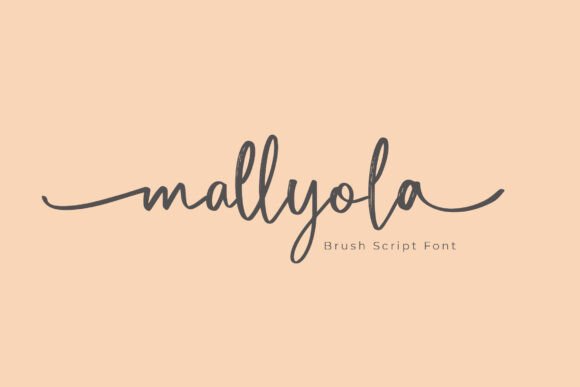
Mallyola: A Bold Script Font for Web Design
There I was, staring at a blank hero section on a new client’s website, trying to find the right visual voice for their brand. They wanted something modern, yet personal—something that felt like it had been handcrafted. That’s when I reached for Mallyola, a handbrush script font from Script Amp. It wasn’t just about the look; it was about the feeling it brought to the screen.
What Makes Mallyola Stand Out
Mallyola isn’t your average script font. It has a handbrush style that feels authentic and alive. The strokes are bold and expressive, with a natural variation that mimics real brushwork. It doesn’t feel too polished or artificial—it feels like it was made by someone who understands the rhythm of a brush against paper. This makes it perfect for brands that want to convey creativity, warmth, and a touch of handmade charm in their digital presence.
The font has a strong personality. It works well as a display font, especially for headlines, logos, and call-to-action buttons. Its unique character shapes give it a sense of movement and energy, which can really elevate the visual hierarchy of a web page. But it also has enough structure to keep things professional and readable, even in smaller sizes.
Using Mallyola in Web Layouts
I tested Mallyola in several web design scenarios, starting with a hero section for a boutique online store. The font looked great over a background image, adding a sense of elegance without overpowering the visuals. It worked especially well as the main headline, drawing the eye and setting the tone for the rest of the page.
On mobile devices, Mallyola maintained its clarity and charm. Even on smaller screens, the font remained legible, though I noticed that very small text could become a bit difficult to read. For this reason, I recommend using Mallyola for larger headings rather than body copy or navigation menus.
Another test involved a landing page for a creative course. I used Mallyola for the title and subheadings, pairing it with a clean sans serif font for the body text. The contrast between the two fonts created a nice balance—Mallyola added personality, while the sans serif kept things easy to read and professional.
Best Use Cases for Mallyola
Mallyola shines in areas where visual impact is key. It’s ideal for headers, logos, and decorative accents. Whether you're designing a portfolio site, a product landing page, or a blog header, Mallyola can add that extra layer of creativity and authenticity.
It also works well in digital ads and social media graphics. The font’s expressive nature helps catch attention, making it a good choice for promotional banners or campaign pages. When paired with bold colors or dynamic imagery, Mallyola can make a strong statement without being overwhelming.
For a more editorial feel, I tried Mallyola on a blog redesign. It worked beautifully as a heading font, giving each post a sense of personality and style. However, I found that using it for longer paragraphs wasn’t as effective. The font’s ornate details can make reading difficult if the text is too dense or long.
Considerations for Web Designers
Before using Mallyola in a live project, it’s important to check what styles and weights are available. Some script fonts have limited variations, which can restrict how they’re used across different parts of a website. Mallyola, however, offers enough flexibility to work in multiple contexts, as long as you’re mindful of its readability.
Also, make sure to consider accessibility. While Mallyola is visually appealing, it may not be the best choice for form labels, navigation menus, or other elements where clarity is essential. In those cases, a simpler font would be more appropriate.
When it comes to licensing, Mallyola is a commercial font, so it’s important to verify that the license covers all intended uses—especially if you're working on a client’s site or selling digital templates. Always check the terms to avoid any legal issues down the line.
Pairing Mallyola with Other Fonts
Font pairing is an essential part of web design, and Mallyola pairs well with a variety of other typefaces. For a modern, clean look, try pairing it with a simple sans serif font like Roboto or Open Sans. This creates a nice contrast between the decorative script and the straightforward body text.
If you’re going for a more traditional or editorial vibe, a serif font like Georgia or Playfair Display can complement Mallyola nicely. The combination adds depth and sophistication, making it ideal for blogs, portfolios, or luxury brand websites.
For a more casual or playful feel, you might pair Mallyola with a handwritten font or a bold display font. This can create a fun and dynamic look, perfect for creative businesses or lifestyle sites.